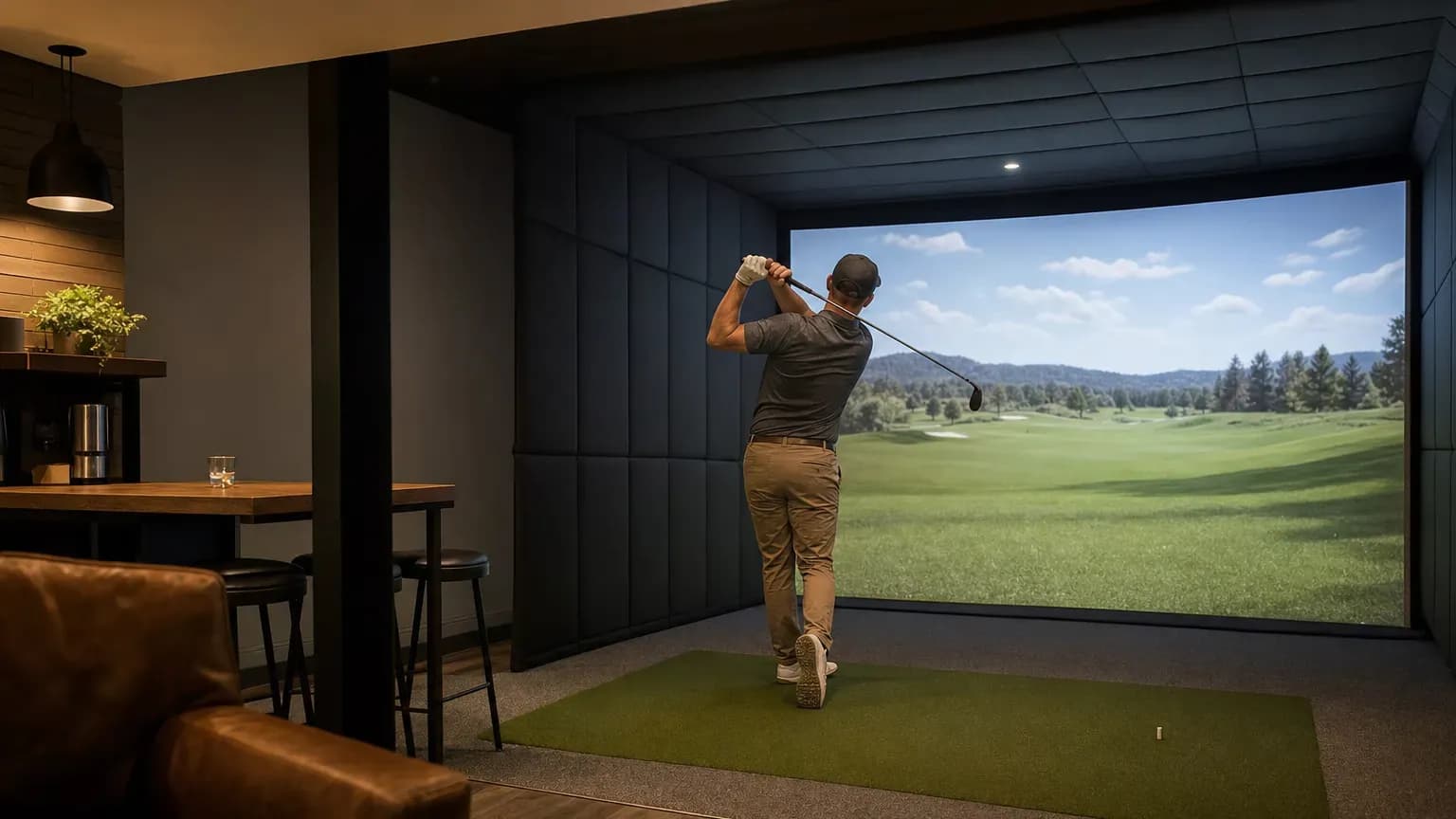
A golf simulator setup needs a space roughly 10 feet high, 15 feet wide and 18 feet deep (3.0 x 4.6 x 5.5 m) for a comfortable full swing, based on launch monitor maker guidance such as Trackman's room specs. Commercial bays usually run 12 to 16 feet wide and 18 to 22 feet deep, which works out to about 280 to 320 square feet per bay before lounge and walkway space. The core components are a launch monitor, a projector, an impact screen and enclosure, a hitting mat, a PC and simulator software. Home setups can start around $3,500 to $6,000. A commercial bay built for daily rental use typically costs $19,000 to $75,000 or more in hardware and licensing, plus build-out, depending on the launch monitor and how custom the enclosure is.
This guide is for owners adding simulators as a revenue line, whether that's one bay in a multi-sport building or a standalone simulator lounge.
Space and ceiling requirements
These are the dimensions most installers plan around. The exact numbers depend on your launch monitor, so check its install guide before you sign a lease.
Dimension | Minimum | Comfortable for a rental bay | Why it matters |
|---|---|---|---|
Ceiling height (clear) | 10 ft (3.0 m) | 10–13 ft (3.0–4.0 m) | Full driver swing for taller players |
Width | 12 ft (3.7 m) | 15–16 ft (4.6–4.9 m) | Room for left- and right-handed players from a centered hitting spot |
Depth | 15 ft (4.6 m) for overhead or side-mounted units | 18–22 ft (5.5–6.7 m) | Ball-to-screen distance plus space behind the golfer; behind-the-ball radar units need more |
Ball to screen | about 10 ft (3.0 m) | 10–12 ft (3.0–3.7 m) | Gives the ball room to travel and reduces bounce-back |
Floor area per bay | about 180–200 sq ft | 280–320 sq ft | Bay plus buffer, before shared space |
A few planning notes:
- Measure clear height, not ceiling height. Beams, ducts, sprinkler lines and light fixtures all count. A low duct right above the hitting spot can rule out a room.
- Launch monitor type changes the depth. Behind-the-ball radar units sit several feet behind the golfer; Trackman's guidance for its Trackman 4 calls for at least 18 feet (5.5 m) from screen to unit. Overhead units free up that space.
- Plan for left-handed players. Center the tee area, and choose a launch monitor that reads both from one spot, or budget time for moving a side-mounted unit.
- Leave room outside the swing zone. Commercial bays usually have seating, a high table and space for a group to wait their turn safely behind the hitter.
For fitting simulator bays into a building with courts or fields, see sports facility design.
Golf simulator components
Component | What it does | What to look for in a rental bay |
|---|---|---|
Launch monitor | Measures ball and club data and feeds the software | Accuracy for full shots and putting, reliability, left/right use, commercial license |
Simulator software | Renders courses, practice ranges and games | Commercial-use license, course library, game modes for groups |
PC | Runs the software | Meets or exceeds the software maker's published spec, especially the graphics card |
Projector | Throws the image onto the screen | Short throw to keep it out of the swing path, brightness for your room lighting, native aspect ratio that fits the screen |
Impact screen | Takes the ball strike and shows the image | Durability, low bounce-back, quiet impact, replaceable |
Enclosure | Frames the screen and contains stray shots | Side and ceiling netting or padding, protection for walls and projector |
Hitting mat | Where the golfer stands and hits | Commercial-grade turf that takes a tee and holds up to daily use; premium nylon turf is recommended over polypropylene for durability |
Lighting | Lights the golfer without washing out the image | Bright light over the hitting area for camera-based units, dimmable elsewhere |
Safety padding | Protects players and the building | Padding on exposed edges, ceiling protection over the swing zone |
Typical 2026 cost ranges
These are typical published price ranges for the US in 2026, cross-checked across several simulator retailers, installers and manufacturer guides. Commercial pricing can differ from home pricing for the same brand because of licensing.
Component | Typical range | Notes |
|---|---|---|
Launch monitor, entry level | about $600–$700 | Usually suited to home use, not daily commercial use |
Launch monitor, mid range | about $2,000–$3,000 | Popular for home and light commercial use |
Launch monitor, professional | about $13,000–$25,000 | Common in commercial bays |
Projector (short throw) | $500–$5,000 | Brightness and resolution drive price |
Impact screen | $400–$2,500 | Size and material thickness |
Enclosure frame | $500–$3,000 | Custom built-in enclosures cost more |
Hitting mat | $150–$800 | Commercial bays usually buy toward the top |
Simulator software (home subscriptions) | $150–$600 a year | Commercial licensing varies by vendor |
Commercial bay, hardware and licensing | $19,000–$75,000+ | Per bay, depending on launch monitor and package |
Commercial build-out per bay | $40,000–$75,000 | Walls, electrical, lighting, finishes, AV; varies most by building |
The launch monitor is the biggest single choice. A professional unit costs many times more than a mid-range one, but it's also the part customers notice when they compare your bays with the competition.
Worked example: two bay budgets
Here's how the numbers add up for one bay. Lines marked "allowance" are planning assumptions, not quotes.
Line item | Mid-range bay in an existing room | Premium commercial bay |
|---|---|---|
Launch monitor | $3,000 | $20,000 |
Projector | $2,000 | $4,500 |
Impact screen | $1,500 | included in enclosure |
Enclosure | $2,500 | $8,000 allowance (custom) |
Hitting mat | $800 | $800 |
PC | $2,500 allowance | $3,500 allowance |
Software, first year | $600 | $2,000 allowance (commercial license) |
Lighting, electrical and install | $3,000 allowance | $40,000 (low end of published build-out range) |
Padding and furniture | $1,000 allowance | included in build-out |
Total | $16,900 | $78,800 |
The mid-range bay suits an existing multi-sport facility adding one simulator to an unused room. The premium bay reflects a purpose-built lounge where customers expect a polished space.
Payback example: running the simulator as a rental bay
Simulator bays are usually sold by the bay-hour, so a group of friends splits one rate. Payback depends on two numbers you set: the hourly bay rate and utilization, the share of open hours that are booked.
Assumptions (illustrative):
- Bay cost: $78,800 (the premium bay above)
- Open hours: 12 a day, 7 days a week = 84 hours a week, 52 weeks a year (indoors, no season)
- Operating costs for this bay: $3,000 a year (software, screen and mat replacement reserve, balls, power, processing)
- Ignores rent, staff, food and beverage, financing and taxes
Formula: annual revenue = rate x 84 hours x utilization x 52 weeks. Payback in years = $78,800 / (revenue − $3,000).
Hourly bay rate | 15% utilization | 25% utilization | 40% utilization |
|---|---|---|---|
$40 | $26,208 a year, payback 3.4 yrs | $43,680 a year, payback 1.9 yrs | $69,888 a year, payback 1.2 yrs |
$60 | $39,312 a year, payback 2.2 yrs | $65,520 a year, payback 1.3 yrs | $104,832 a year, payback 0.8 yrs |
$80 | $52,416 a year, payback 1.6 yrs | $87,360 a year, payback 0.9 yrs | $139,776 a year, payback 0.6 yrs |
The rates are inputs, not market data; check what bays near you charge. And this table leaves out rent and staff, which are the biggest costs for a standalone simulator business. Add your share of those per bay to the operating cost before you trust the payback. Simulator demand also tends to be seasonal in cold-winter markets, so weekday daytime hours in summer may sell slowly.
How to run a simulator bay as a rental
Set booking lengths. Sell 1-hour blocks for practice and 2- or 3-hour blocks for groups playing a round. Avoid 30-minute slots unless you have walk-in demand to fill the gaps.
Price peak and off-peak. Evenings and weekends usually fill first. A lower weekday daytime rate, or a package for lessons, helps fill quiet hours.
Take payment when they book. No-shows hurt simulator bays because a group booking is often for several hours. Charge at booking or hold a card with a clear cancellation cutoff.
Add extras to the booking. Club rental, gloves and lessons can be added to the bay booking instead of sold separately at the desk.
Hold recurring slots for leagues. Winter simulator leagues fill regular weeknight slots, which lifts utilization during the quiet season.
Check the bay between bookings. Inspect the screen for wear, reset the software and clear the hitting area so the next group starts on time.
Setup checklist
- Clear height of at least 10 ft over the swing zone, measured to the lowest obstruction
- Width of 15 ft or more with a centered hitting spot
- Depth of 18 ft or more, or more for behind-the-ball radar
- Launch monitor and software licensed for commercial use
- PC that meets the software maker's spec
- Short-throw projector mounted out of the swing path and protected
- Impact screen, enclosure and padding on all exposed surfaces
- Lighting set up for the launch monitor and the projected image
- Seating and waiting space outside the swing zone
Running bookings for simulator bays
A booking system for golf simulator bays lets groups see open times and reserve a bay before they arrive.
In Sports Booking Management, each bay is its own bookable space with its own hours and rates. Pricing tiers by booking length cover hourly practice sessions and longer group blocks, and you can set different rates per bay. Customers book on a public page you can embed on your website and pay through Stripe checkout. Club rental can be added as an add-on, recurring bookings hold league nights, and an optional approval step lets you review larger event requests. It's one plan at $79 a month with unlimited bays and bookings. If you also run courses or a range, see our page for golf facilities.